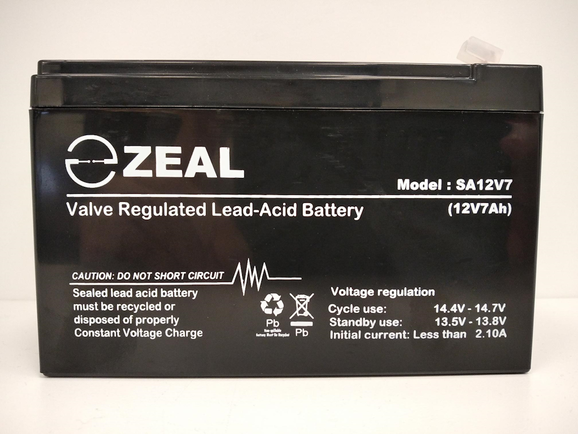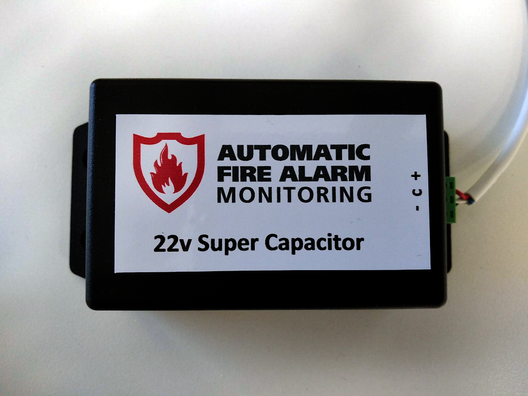
Last WeekWe took a break from our usual product updates to share some exciting AFAM news — including recruiting an Auckland-based BDM and opening a new Auckland office! If you missed it, you can catch up here AFAM News & Updates. This Week: Backup Power SourcesThis week we’re talking about backup power sources for the CTU and connected devices. It might not be the flashiest topic, but it’s one of the most important — because getting it wrong can cause real headaches later on. Backup Power OptionsWe currently support two types of backup power sources:
The best option depends on your installation type and how many systems are connected. SLA Batteries Invented in the 1970s, the Sealed Lead Acid (SLA) battery became the standard for reliability and consistency. It uses lead plates and an acid-based liquid or gel to store and release charge. Traditional lead acid batteries as a technology were invented in 1859. Super Capacitors Super Capacitors work similarly to normal capacitors but are far more efficient at storing and releasing energy. They excel at delivering high currents when needed and aren’t affected by temperature in the same way as SLA batteries. Battery vs Super Capacitor - Which to Use?We generally use Super Capacitors when the CTU is installed in-panel and not connected to any secondary system. For all other installations, a battery is required. The required battery size depends on the number of connected systems — full details are in our installation instructions. If you’re unsure, our support team is always happy to help. Battery Quality MattersNot all batteries are created equal. Even if two look the same, their internal build quality can differ significantly. When purchasing batteries, stick with reputable brands and suppliers. Check the warranty period — shorter warranties often indicate cheaper, less reliable batteries. While budget options can seem tempting, they often cost more in the long run. 6 Volt BatteriesPreviously, some in-panel installations used two 6V batteries connected in series. However, when the original manufacturer discontinued these batteries, we were unable to find an alternative that met our performance standards. We now supply a single 12V 2.9Ah battery, which comfortably meets all backup requirements for new installations. For existing systems, we can still supply 6V replacements in the same form factor, but these now carry a 6-month warranty, reflecting the warranty provided by our supplier. If you have any questions, our support team can help. Battery vs Super Capacitor Confusion - Avoid the Mix UpAs we mentioned in a recent Tips & Tricks newsletter, the CTU can use either a battery or a Super Capacitor — never both at the same time. The Super Capacitor connector includes a detection pin that tells the CTU what’s connected. If both are plugged in, the battery can overcharge and be damaged. Connecting to the wrong port won’t harm the CTU, but it can leave the system without a proper backup. When in doubt, check your connectors or contact our support team — they’ll help ensure everything’s set up correctly. Coming Next WeekNext week, we’re diving into Solomon and focusing on features for Service Agents — including how to access them both in the office and on-site (even after hours). We’ll show you what’s available and how these features can make your work smoother and more efficient.
Last WeekWe took an in-depth look at the AFAM Property Portfolio Portal and how it benefits property owners and managers. If you missed it, you can catch up here AFAM Property Portfolio Portal. This Week: News & UpdatesWe’re taking a short break from our usual product focus to share some exciting news and updates we’ve been eager to tell you about. Auckland based Business Development ManagerYou may have seen on Seek that we’re hiring an Auckland-based Business Development Manager — if not, you can view the listing here: Business Development Manager. This role will strengthen our presence across Auckland, Hamilton, and Tauranga, helping us build new relationships and support existing ones. The BDM will manage key accounts, work closely with service agents and property managers, and act as the voice of the customer to help shape our products and services. If you know someone who might be interested, please share the link with them. Auckland OfficeWe’ve been planning to open an Auckland office for some time — and with the new BDM role, the timing is right. The new office will host our Auckland-based team and hold a small amount of monitoring equipment and spares for the region. We’ll start small, likely in a shared office while we establish operations. We’re currently looking at locations in Penrose or Mount Wellington and have a couple of possible options. If your business has space available to sublet in that area or close by, we’d love to hear from you. We’ll share more details once the location is confirmed. Installatiton VideosOur new installation videos are ready! There’s one covering in-panel CTU installations and another for in-box installs. You can watch them via the links below or in the Resources section on our website. We’d love your feedback — and if there are other topics you’d like us to cover, let us know. New CTU in DevelopmentEarlier this year, we quietly began a ground-up redesign of our CTU monitoring hardware. Our current CTU has served the industry well for a decade, evolving through multiple improvements — but we’re now building a platform that can support new features and capabilities the current one can’t. It’s a complex process, and you’ll start seeing the new hardware next year. In an upcoming article, we’ll share more about what’s coming — but if you have suggestions or feature requests, we’d love to hear them. Let’s just say… this new CTU will be unlike anything currently available in New Zealand (and beyond). New Service Agent Features in SolomonFor our service agents — the wait is over! The IoT detector-level floorplan information previously available only in the AFAM Property Portfolio Portal is now being rolled out within Solomon to beta users and will be available to everyone in the next two weeks. This feature lets you view live detector-level data on floorplans, query individual detector history, and much more. We’ll cover this in more detail in an upcoming newsletter focused on Solomon’s new features. Coming Next WeekNext week, we’re diving into backup power sources — batteries vs. super capacitors. We’ll explore how they differ, what AFAM supports, and when (and why) to use each.
Last WeekWe explored AFAM’s Reports & Analytics — what’s available and how you can access it. If you missed it, you can catch up here Reporting & Analytics. This Week: AFAM Property Portfolio PortalThis week, we’re taking a closer look at the AFAM Property Portfolio Portal, which we introduced briefly a few weeks ago. OverviewThe AFAM Property Portfolio Portal is designed for property owners and managers with multi-property portfolios. Traditionally, visibility into the state of fire alarm systems relies on updates from service agents. The Portfolio Portal changes that — giving owners and managers direct, independent access to live system information across all their properties. At a glance, you can see the overall state of your portfolio, then drill down to granular, real-time data — even individual IoT detector-level information where available. DashboardWhen you first log in, you’ll see a comprehensive dashboard summarising key details across your portfolio, including:
AFAM’s monitoring equipment natively supports IoT detector-level access for a wide range of panels and installation types. See our compatibility guide. Map & Table ViewsFrom the dashboard, you can move into a map view (with a familiar maps style interface) or switch to a table view if you prefer structured data. As you would expect with the map view, the level of detail changes as you zoom in revealing street data, buildings, and features such as parks and trees. Both views allow you to filter by:
Selecting a property reveals key details such as:
IOT Detector Level InformationFor properties with IoT connectivity, the portal offers deep, detector-level visibility — showing detector types, zones, states, and recent changes. Where available, floorplans can be uploaded, allowing detectors to be placed visually on each level. Their icons update in real time to reflect live status and individual detector history can be accessed. For multi-storey, or larger single storey properties, multiple floorplans can be uploaded to best represent the property. (The example shown here displays live data from a seven-storey building in Wellington.) Access & CostAccess to the portal is completely free. We actively encourage property owners and managers to take advantage of it. Please contact our support team who can enable access to it for you. Brochure & DemoIf you manage multiple properties, or have clients who could benefit from the portal, you can download our overview brochure by clicking on the image below. We’d also be happy to arrange a live demo to walk you through the platform and answer any questions — just get in touch. Coming Next WeekNext week, we’ll take a short break from our usual product and service deep-dives to share some exciting news about AFAM. We’ll also be announcing a major new feature launch and providing updates on a few developments we’ve mentioned in recent weeks.
|
BlogWe'll post info here relevant to the industry. Mostly about happenings, technology, our products, and services. Subscribe, or follow us on social media, for updates. Archives
November 2025
Categories
All
|
RSS Feed