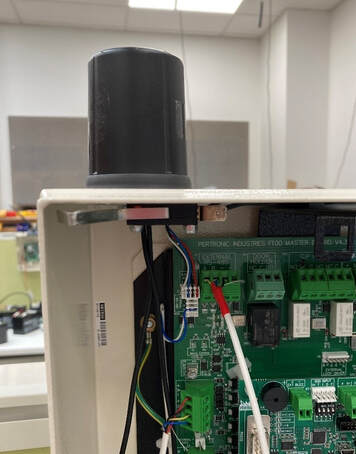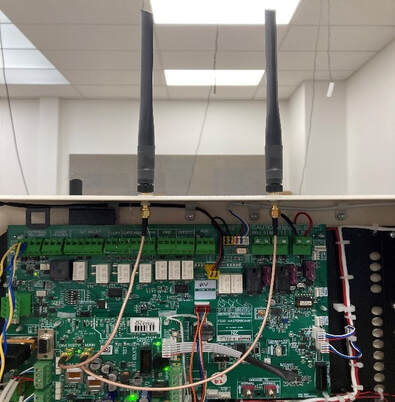
Last WeekWe took a closer look at our monitoring system—how it works, why it works the way it does, and we dispelled a few common myths along the way. If you missed it, you can catch up here AFAM Monitoring System. This Week: Next Generation CTUA couple of weeks ago we shared that we’ve begun developing a next-generation version of our CTU monitoring device. This week, we’re excited to give you a deeper look at what’s underway. Next Generation CTUEarlier this year, we quietly kicked off a ground-up redesign of our CTU hardware. Our current CTU has served the industry for more than a decade, evolving through multiple updates and still outperforming alternatives. However, there are new features and services we want to deliver that the current design simply can’t support. This redesign lays the foundation for those capabilities—both for today and for the future. Be rest assured though, everything that the current CTU provides such as in panel installation and native IoT Detector Level information capture will be carried forward. We're not going to remove any existing functionality, we're going to add to it. A Common PlatformRight now, we manufacture two CTU variants, chosen based on whether the device will be installed inside a panel or not. The new CTU will be built as a single common platform, with an optional secondary board (added during manufacturing) to meet specific installation requirements. This gives us far more flexibility, makes future feature expansion easier, and even opens the door to potential use in new markets here and overseas. Bluetooth ConnectivityThe next-generation CTU includes built-in Bluetooth. One major use will be enabling authorised users to connect via the AFAM AlarmTech App for diagnostics and commissioning while on-site. This will mean guided commissioning prompts, clear indications of what’s correct or incorrect, and far less reliance on manuals, prior knowledge, or interpreting LEDs on the unit. Processor & MemoryThis new CTU isn’t just faster—it’s dramatically faster.
This leap in capability allows far more processing to happen directly on the device, which will be crucial for the new services we’re planning. Inputs & OutputsAs with the current CTU, the new device will include four versatile inputs. (If you missed our article on how those inputs work, you can read it here: CTU Additional Inputs) The next-gen CTU will also feature two outputs, allowing the device not just to monitor equipment but to activate it when required. Advanced Battery ManagementWe’ve designed the new CTU around a modern, commercial-grade battery management system. Battery management technology has advanced significantly since our current model was introduced, and this upgrade will improve charging, monitoring, and overall battery lifespan. When Will It Be Available?We’re still in the prototyping phase. While we’d love to release it this year, that won’t be possible. Hardware development takes time, and our best estimate is that the CTU will be ready sometime early to mid next year. What Else Could It Do?There’s plenty we haven’t revealed yet—and we’d love your input. If there’s something you’d like the new CTU to be capable of, let us know. We may already be working on it, or it might be something we can still build in. We can’t promise every idea will make it, but we’re listening. Coming Next WeekWe’ve got some news to share—and a few interesting updates you won’t want to miss.
Last WeekWe took an in-depth look at the AFAM Property Portfolio Portal and how it benefits property owners and managers. If you missed it, you can catch up here AFAM Property Portfolio Portal. This Week: News & UpdatesWe’re taking a short break from our usual product focus to share some exciting news and updates we’ve been eager to tell you about. Auckland based Business Development ManagerYou may have seen on Seek that we’re hiring an Auckland-based Business Development Manager — if not, you can view the listing here: Business Development Manager. This role will strengthen our presence across Auckland, Hamilton, and Tauranga, helping us build new relationships and support existing ones. The BDM will manage key accounts, work closely with service agents and property managers, and act as the voice of the customer to help shape our products and services. If you know someone who might be interested, please share the link with them. Auckland OfficeWe’ve been planning to open an Auckland office for some time — and with the new BDM role, the timing is right. The new office will host our Auckland-based team and hold a small amount of monitoring equipment and spares for the region. We’ll start small, likely in a shared office while we establish operations. We’re currently looking at locations in Penrose or Mount Wellington and have a couple of possible options. If your business has space available to sublet in that area or close by, we’d love to hear from you. We’ll share more details once the location is confirmed. Installatiton VideosOur new installation videos are ready! There’s one covering in-panel CTU installations and another for in-box installs. You can watch them via the links below or in the Resources section on our website. We’d love your feedback — and if there are other topics you’d like us to cover, let us know. New CTU in DevelopmentEarlier this year, we quietly began a ground-up redesign of our CTU monitoring hardware. Our current CTU has served the industry well for a decade, evolving through multiple improvements — but we’re now building a platform that can support new features and capabilities the current one can’t. It’s a complex process, and you’ll start seeing the new hardware next year. In an upcoming article, we’ll share more about what’s coming — but if you have suggestions or feature requests, we’d love to hear them. Let’s just say… this new CTU will be unlike anything currently available in New Zealand (and beyond). New Service Agent Features in SolomonFor our service agents — the wait is over! The IoT detector-level floorplan information previously available only in the AFAM Property Portfolio Portal is now being rolled out within Solomon to beta users and will be available to everyone in the next two weeks. This feature lets you view live detector-level data on floorplans, query individual detector history, and much more. We’ll cover this in more detail in an upcoming newsletter focused on Solomon’s new features. Coming Next WeekNext week, we’re diving into backup power sources — batteries vs. super capacitors. We’ll explore how they differ, what AFAM supports, and when (and why) to use each.
Last WeekWe shared some handy tips to make CTU installations smoother — plus how to avoid and fix the top five issues our support team encounters. If you missed it, you can catch up here: CTU Installation Tips and Tricks. This Week: CTU Additional InputsWe’d planned to look at messaging options this week — but after last week’s article, we had so many requests about CTU Additional Inputs that we’ve bumped it up the list. Messaging will now feature next week. Additional Inputs OverviewEach CTU supports up to four additional inputs (depending on installation type) that can monitor a wide range of devices. If it can drive a relay, it can be monitored. We’ve seen these inputs used for:
Cost to Monitor Additional InputsHow much does it cost to monitor additional inputs? Practically nothing. Actually, it’s completely free. If you already have a CTU installed, you can use the additional inputs — and all related messaging — at no extra charge. We actively encourage you to take advantage of this feature. Messaging for Additional InputsYou can set up custom messaging to alert specific people when a monitored device:
Message text is fully customisable and can be sent by SMS, email, or via the AFAM AlarmTech App. These alerts follow your normal messaging strategies — which we’ll explore in detail next week. Isolating Additional InputsNeed to work on a monitored device without triggering alerts? You can easily isolate an input for a set period. There are a few ways to do this, depending on your setup — just contact our support team, and they’ll walk you through it. Can I Monitor This Device?If you’re unsure whether a specific device or system can be monitored, get in touch with our support team. Chances are, we’ve seen it (or something very close to it) before — penguin enclosures aside. Penguin PictureEnjoyed the penguin photo above? Check out the animated version on our LinkedIn page — or simply click the image to head there. While you’re at it, follow us for more updates and behind-the-scenes insights. Coming Next WeekNext week, we’ll really dive into CTU messaging options, including:
|
BlogWe'll post info here relevant to the industry. Mostly about happenings, technology, our products, and services. Subscribe, or follow us on social media, for updates. Archives
December 2025
Categories
All
|
RSS Feed