
Last WeekWe gave you a general overview of the CTU—our purpose-built monitoring hardware—and what to think about when choosing an installation location. If you missed it, you can catch up here: CTU Installation Options. This Week: CTU Installation Tips and TricksA smooth CTU installation can save you time (and a few headaches). While the process is straightforward, there are some common issues we see again and again. This week we’re sharing our top tips, the most frequent installation mistakes, and a couple of hidden features you may not know about. Top 5 Installation Issues We SeeHere are the 5 most common installation issues our support team encounters. 1. SGD addresses not set correctly The CTU polls each connected SGD in sequence to check the status of the fire alarm system. It does this by sending a message from the configured port and waiting for a response from the SGD at the assigned address. If the address on a multi-droppable SGD is set incorrectly—or if it’s connected to the wrong CTU port—the two devices won’t be able to communicate. 2. Loom Installed the wrong way around This issue is easy to run into on some panels and applies only to in-panel installations. If the loom between the CTU and the panel is connected the wrong way around, the CTU won’t be able to read the panel’s status correctly, and the panel will often flag a “Defect.” To avoid this, check the installation guide carefully, ensure the loom isn’t twisted, and confirm it’s plugged into the correct port. One of the loom wires is marked to help you align it the right way—use this as your guide. 3. SGD not enabled via panel links or programming Some fire alarm panels require programming or a jumper to be placed in the correct position on the motherboard to enable the SGD interface. Without this, the SGD won’t be activated and won’t be able to read the panel’s status. If you notice the SGD showing a different state than the panel, this should be the first thing to check. In addition, some CTUs require a jumper to activate the second SGD port. These jumpers are normally configured correctly before the CTU is dispatched, but if they have been removed for any reason, it can cause issues. Always refer to the installation instructions to confirm jumper placement. In both cases, the fix is usually straightforward. If you’re unsure, our support team is happy to help you diagnose and resolve any problems. 4. Aerial Installation Issues Two common aerial installation mistakes:
5. Battery vs SuperCap confusion The CTU is designed to use either a battery or a SuperCap as its backup power supply—but never both at the same time. The SuperCap connector has a detection pin, which the CTU uses to recognize when a SuperCap is connected. If both a battery and SuperCap are plugged in, the battery can be overcharged and potentially damaged. Our support team will usually catch this during commissioning, but the rule is simple: use either a battery or a SuperCap, never both. Sometimes we see batteries connected to the SuperCap port, or vice versa. This won’t harm the CTU, but it will leave it without an effective backup. Always double-check which port you’re using, and avoid modifying connectors to make them fit. When in doubt, give our support team a quick call—they’ll help you get it right. Installation ResourcesEvery CTU ships with an installation guide—but we know those sometimes get left behind in the van or misplaced on-site. Don’t worry: we keep digital copies of all guides here: Installation Guides. It’s always worth having the latest version to hand before starting the install. Support When You Need ItIf you’re unsure where to start or run into something unexpected during installation, give our support team a call. They’ll be happy to help and answer your questions. A quick call upfront can often save time later during CTU commissioning. Did You Know?
Coming Next WeekWe’ll be taking a closer look at messaging options, including:
Battery backupTo maintain uninterrupted monitoring of a buildings fire alarm system even during mains power outages, our systems are equipped with backup power sources. We utilise two distinct types of backup power sources:
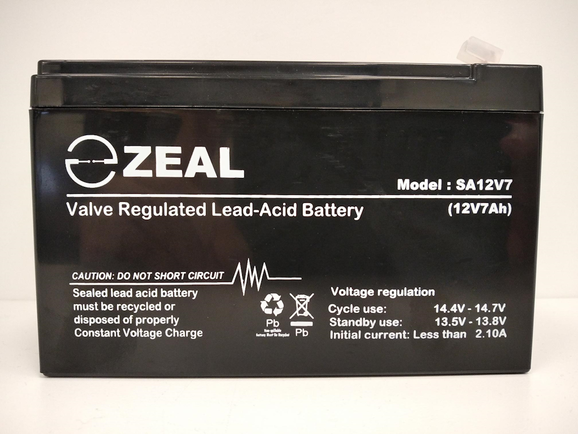
Lead Acid BatteriesGeneral Information When buying a lead-acid battery, there are several important factors to consider to ensure you choose the right battery for your needs. Lead-acid batteries are used in a variety of applications including vehicles, uninterruptible power supplies (UPS), solar energy storage systems, and more. Here are some key considerations:
Selecting a replacement When it comes time to replace a lead acid battery do think carefully when selecting a replacement. Whilst it can be tempting to opt for the cheaper option, as a general rule they won't last as long or perform as well. Purchasing a more expensive option from a reputable brand will often save time and money in the long run. Super CapacitorsGeneral Information
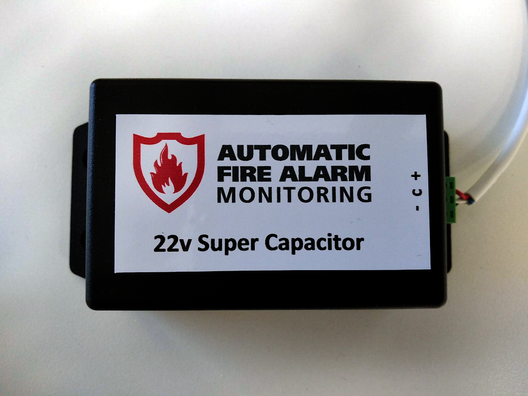
A super capacitor, also known as an ultra capacitor or electric double-layer capacitor (EDLC), is an energy storage device that stores and releases electrical energy through the electrostatic separation of positive and negative charges. Unlike traditional capacitors that use a dielectric material to store charge, super capacitors store energy in an electric double-layer formed at the interface between a high-surface-area electrode and an electrolyte. Some of the key characteristics of super capacitors are:
Selecting a replacement If you believe that a super capacitor connected to one of our systems needs to be replaced, please contact us and we'll guide you through the process. |
BlogWe'll post info here relevant to the industry. Mostly about happenings, technology, our products, and services. Subscribe, or follow us on social media, for updates. Archives
October 2025
Categories
All
|
RSS Feed